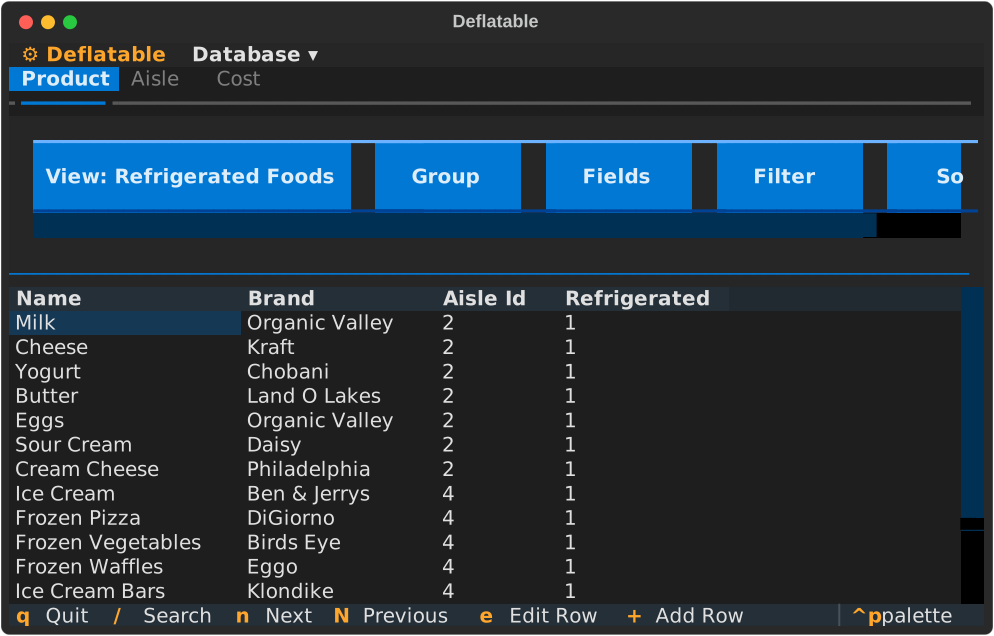
Record links allow you to display fields from related tables directly in your main table view, without writing SQL joins. This is useful for showing context from foreign key relationships.
What Are Record Links?
When you have a foreign key relationship, you might want to see information from the related table without switching views. For example:
Viewing products and seeing the aisle’s refrigeration status
Viewing orders and seeing the customer’s country
Viewing employees and seeing their department name
Record links create virtual columns that pull data from the related table.
Configure a Record Link
Record links are configured in your YAML config file under each table’s record_links section.
Basic Configuration
views:
  product:
    record_links:
      aisle_id:
        lookup_fields:
          - "refrigerated"
This configuration:
Targets the
aisle_idforeign key in the product tableCreates a virtual column
aisle_id__refrigeratedthat shows the refrigerated value from the linked aisle record
Custom Display Names
views:
  product:
    record_links:
      aisle_id:
        display_name: "Aisle"
        lookup_fields:
          - field: "refrigerated"
            display_name: "Is Refrigerated"
          - field: "length_feet"
            display_name: "Aisle Length"
This creates:
aisle_id__refrigerateddisplayed as “Aisle → Is Refrigerated”aisle_id__length_feetdisplayed as “Aisle → Aisle Length”
Multiple Lookup Fields
You can expose multiple fields from the related table:
views:
  order:
    record_links:
      customer_id:
        lookup_fields:
          - "country"
          - "city"
          - "email"
This creates three virtual columns:
customer_id__countrycustomer_id__citycustomer_id__email
Use Lookup Fields in Views
Once configured, lookup fields can be used anywhere regular columns are used.
Display in Tables
Add lookup fields to visible_fields:
views:
  product:
    record_links:
      aisle_id:
        lookup_fields:
          - "refrigerated"
    views:
      All:
        visible_fields:
          - id
          - name
          - aisle_id
          - aisle_id__refrigerated
          - price
The table will now show both the aisle ID and whether that aisle is refrigerated.
Filter by Lookup Fields
views:
  product:
    views:
      "Refrigerated Products":
        filters:
          - [aisle_id__refrigerated, "=", "1", "and"]
This filters products to only those in refrigerated aisles.
Sort by Lookup Fields
views:
  product:
    views:
      "By Aisle Length":
        sort_config:
          - [aisle_id__length_feet, desc]
This sorts products by their aisle’s length.
Group by Lookup Fields
views:
  product:
    views:
      "Grouped by Refrigeration":
        grouping: aisle_id__refrigerated
This groups all products by whether their aisle is refrigerated.
Column Naming Convention
Lookup columns follow the pattern: <fk_column>__<lookup_field>
Examples:
Foreign key
aisle_idwith lookup fieldrefrigerated→aisle_id__refrigeratedForeign key
customer_idwith lookup fieldcountry→customer_id__countryForeign key
category_idwith lookup fieldname→category_id__name
When to Use Record Links
Good Use Cases:
Displaying category names instead of just IDs
Showing status or type information from a lookup table
Adding context without switching between tables
Filtering or grouping by related table attributes
Not Recommended:
Pulling large text fields (descriptions, notes) - these can slow down queries
Creating deeply nested lookups (lookup of a lookup)
Replacing proper table navigation for detailed exploration
Performance Considerations
Record links execute SQL joins behind the scenes. Some tips:
Limit lookup fields: Only include fields you actually use
Index foreign keys: Ensure foreign key columns are indexed in your database
Avoid text fields: Lookup numeric or small text fields when possible
Monitor query time: If views become slow, reduce the number of lookup fields
Example: Product with Aisle Information
This complete example shows products with aisle context:
database: sqlite:///grocery.db

views:
  product:
    record_links:
      aisle_id:
        display_name: "Aisle"
        lookup_fields:
          - field: "refrigerated"
            display_name: "Is Refrigerated"
          - field: "length_feet"
            display_name: "Length"
    views:
      All:
        visible_fields:
          - id
          - name
          - brand
          - aisle_id
          - aisle_id__refrigerated
          - aisle_id__length_feet

      "Refrigerated Items":
        visible_fields: [name, brand, aisle_id]
        filters:
          - [aisle_id__refrigerated, "=", "1", "and"]
        grouping: aisle_id
        sort_config:
          - [name, asc]
This configuration:
Creates lookup columns for refrigerated status and aisle length
Shows them in the “All” view
Creates a “Refrigerated Items” view that filters by the lookup field
Multiple Foreign Keys
Tables can have multiple foreign keys, each with their own record links:
views:
  order_item:
    record_links:
      order_id:
        lookup_fields:
          - "order_date"
          - "customer_name"
      product_id:
        lookup_fields:
          - "category"
          - "price"
    views:
      All:
        visible_fields:
          - id
          - order_id__order_date
          - order_id__customer_name
          - product_id
          - product_id__category
          - quantity
Editing Behavior
Lookup fields are read-only. You cannot edit them directly because they come from related tables.
To change a lookup value:
Navigate to the related table (e.g., aisle)
Edit the record there
Return to the original table - the lookup value updates automatically
Troubleshooting
“Column not found” Error
Problem: You referenced a lookup field that doesn’t exist.
Solution: Check that:
The foreign key is configured in
record_linksThe lookup field exists in the related table
The column name uses the correct format:
fk_column__lookup_field
Lookup Shows NULL
Problem: The lookup column shows NULL for all rows.
Solution:
The foreign key value is NULL (no relationship)
The related record doesn’t exist (orphaned foreign key)
The lookup field name is misspelled
Slow Performance
Problem: Views with lookup fields load slowly.
Solution:
Reduce the number of lookup fields
Ensure foreign key columns are indexed
Consider removing lookup fields from large text columns
Best Practices
Use Descriptive Display Names: Make it clear which table the field comes from
# Good
display_name: "Customer Country"

# Less clear
display_name: "Country"
Limit Lookup Fields: Only expose what you need
# Good - focused
lookup_fields:
  - "status"
  - "priority"

# Too much - includes everything
lookup_fields:
  - "status"
  - "priority"
  - "created_at"
  - "updated_at"
  - "notes"
  - "description"
Group Related Information: When showing lookup fields, group them near their foreign key
visible_fields:
  - id
  - name
  - aisle_id
  - aisle_id__refrigerated  # Keep lookup near FK
  - aisle_id__length_feet
  - price  # Unrelated fields after