A no-code database browser and editor that runs in your terminal.
Deflatable provides a fast, keyboard-driven interface for exploring and modifying any SQL database without writing queries. Built with Textual, it offers a modern TUI experience with mouse and keyboard support.
Features
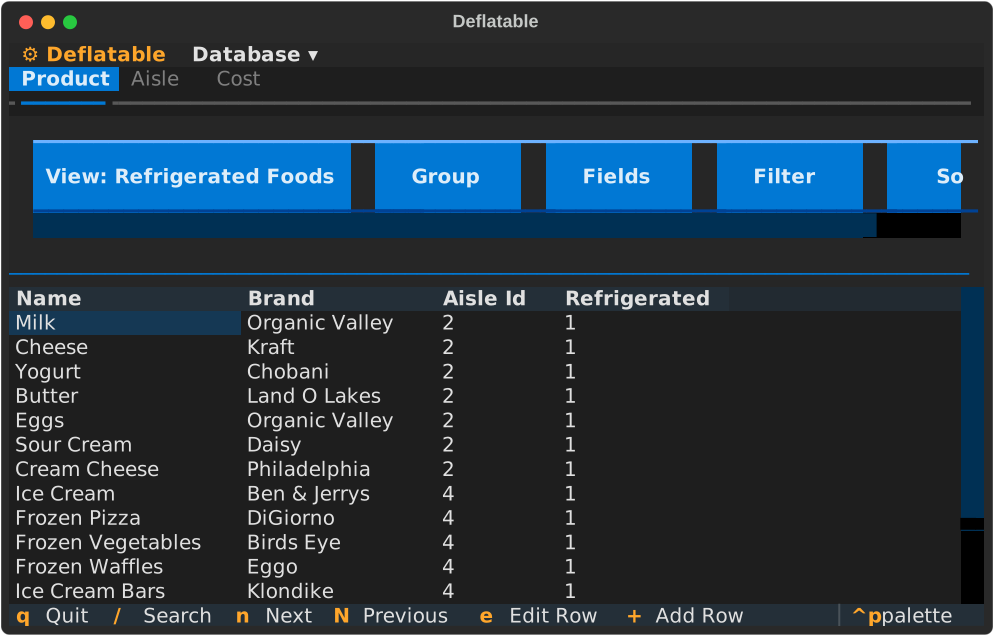
No-code editing: Browse, filter, sort, add, edit, and delete rows without SQL
Database agnostic: Works with SQLite, PostgreSQL, MySQL, DuckDB, and more via SQLAlchemy
Custom views: Save filtered, sorted, and grouped views for quick access
Foreign keys: Automatically detects and displays relationships with dropdowns
Record links: Display fields from related tables inline using lookup columns
Fast navigation: Keyboard shortcuts for everything (with mouse support too)
Terminal native: Runs anywhere you have a terminal - local or remote
Quick Start
Install Deflatable from source:
git clone https://github.com/ryanlovett/deflatable.git
cd deflatable
pip install -e .
Create a config file for your database:
# For SQLite
deflatable init myconfig.yaml sqlite:///path/to/database.db

# For PostgreSQL
deflatable init myconfig.yaml postgresql://user:pass@localhost/dbname

# For DuckDB
deflatable init myconfig.yaml duckdb:///data.duckdb
Run the TUI:
deflatable myconfig.yamlWhy Deflatable?
For developers: Quickly inspect and modify database state during development without context switching or writing throwaway SQL queries.
For data analysts: Interactively explore datasets with filtering, sorting, and grouping capabilities.
For database administrators: Manage databases efficiently with keyboard-driven navigation and custom views for common tasks.
For teams: Share consistent database workflows through version-controlled configuration files that define views, filters, and display preferences.
For everyone: Work with any SQL database using a unified, intuitive interface - no SQL knowledge required.
Learn More
Step-by-step guides to get you started with Deflatable.
Practical guides for specific tasks.
Technical reference for configuration and features.
Understand how Deflatable works under the hood.
Key Concepts
Config File: A YAML file that specifies your database connection and saved views.
Views: Named combinations of filters, sorts, grouping, and visible fields. Create as many as you need and switch between them instantly.
State Management: Deflatable tracks your current view configuration and marks it as modified when you make changes. Save changes back to the config file to persist them.
Foreign Keys: Deflatable automatically detects foreign key relationships and displays them as dropdowns in edit forms, showing human-readable names instead of IDs.
Project Status
Deflatable is under active development. Current features:
Browse tables with pagination
Add, edit, and delete rows
Filter with comparison operators (>, <, =, contains, etc.)
Sort by multiple columns
Group by columns
Custom views with saved configurations
Foreign key detection and display
Search within tables
Community
Issues: GitHub Issues
Discussions: GitHub Discussions
License
BSD 3-Clause License - see LICENSE file for details.